

How To... Fold an 8 Page Zine From a Sheet of Paper
This is the easiest, simplest way to make a zine and anyone can do it.
You will need...
- A sheet of white printer paper.
It can be any size, but this is usually done with the standard letter size (8.5 x 11 in.) sheets. You can also try this with ledger size if you want slightly larger pages. - Scissors
- A bone folder will help you make cleaner folds than just using your fingers, but it's not a strict requirement.
The Graphic Design workrooms have a few you can borrow. If you're planning to make tons of zines or do a lot of work that involves folding paper, I'd say it's worth the investment to get your own. You can also use a stiff ruler in a pinch.
You'll also want some different pens, pencils, or other materials to fill your zine with. Get creative!
Fold and Cut Your Sheet!
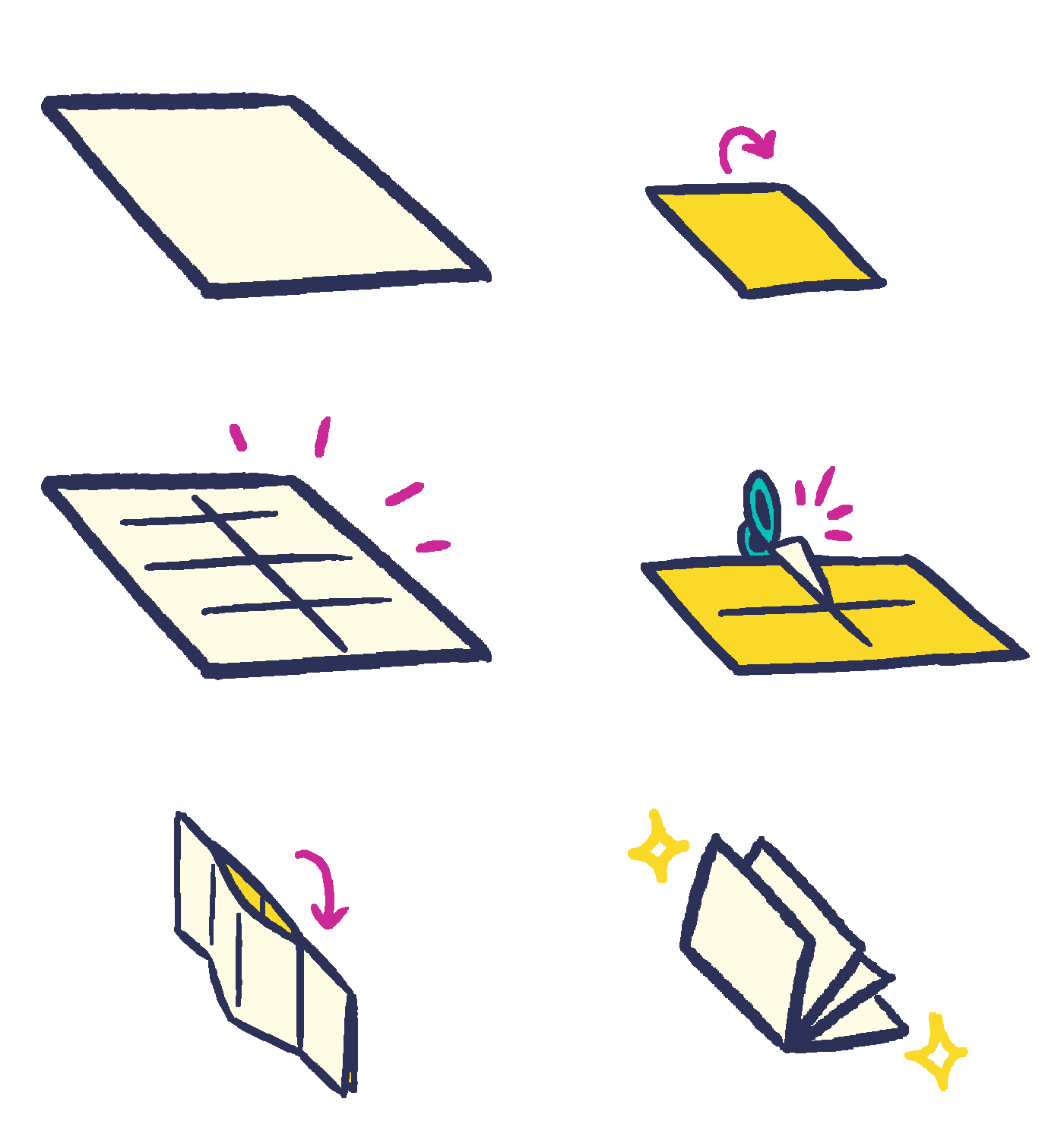
First, fold the sheet into eighths. In classic American food terminology, that would be one fold hotdog style, two folds hamburger style.
Next, fold the sheet in half hamburger style again, and this time take your scissors and cut it halfway down the middle.
Here comes the tricky part. Fold the sheet hotdog style, but pull the middle sections outward and push the ends inward to make a sort of X shape.
Now, fold and flatten it into a book shape. You're done!
If you're having trouble keeping it flat, smooth it out with a bone folder or leave it squeezed underneath some heavy books for a few hours.
Making Copies with the Xerox
The Graphic Design Department has its own Xerox machine— AKA a photocopier. It's free for anyone in the program to use!
Things to keep in mind with the Xerox
- The Xerox is only capable of printing in black and white. If it's necessary that you print it in color, you'll need to scan it to your computer and then print it via Synergy Lab or the Library.
- The Xerox can't print full bleed. This means it can't print all the way to the edge of the paper. Leave a small margin around your sheet (around a quarter-inch or 0.5mm). If it's important for you to print it full bleed, you'll need to scan it in to your computer and then print it via Synergy Lab, or print it yourself to a larger tabloid size and trim it down. If you're trimming it down yourself, throw your scans into an Adobe InDesign doc and then export a PDF with crop marks.
To make copies on the Xerox...
Unfold your zine and flatten it out. This original copy is your master copy.
Open up the Xerox's scanning bed, and then lay your sheet written/illustrated-side down, placed horizontally against the top left corner.
Shut the scanning bed, then tap Copy
on the screen. Make sure you have 8.5 x 11 selected as your paper stock.
You should also open the paper tray and double check that you have the right paper you want to print to in there. I've accidentally printed to color paper a few times...
Tap Start
and watch the magic happen. The Xerox will scan your zine and then spit out a copy of it.
Your first copy might be a misprint as the Xerox figures out what's on your sheet. Try again, or ask a studio tech for help if you continue to have issues. Try saving your misprints for collages!